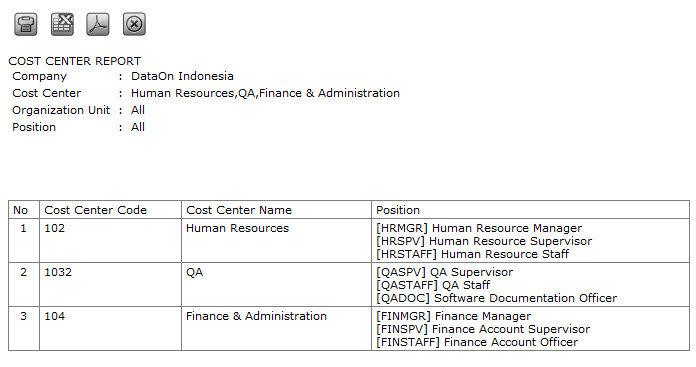
Cost Center Report
Cost Center Report functions to view organization structure based on financial perspective. Cost Center divides functional organization, and the organization unit is differentiated in which the cost or billable cost occurs. Cost Center setting is used to define and maintain unit and sub unit, in which the organization can be separated from the cost perspective. To access this menu, go to Organization > Organization Structure Report > Cost Center Report then the following page will appear.
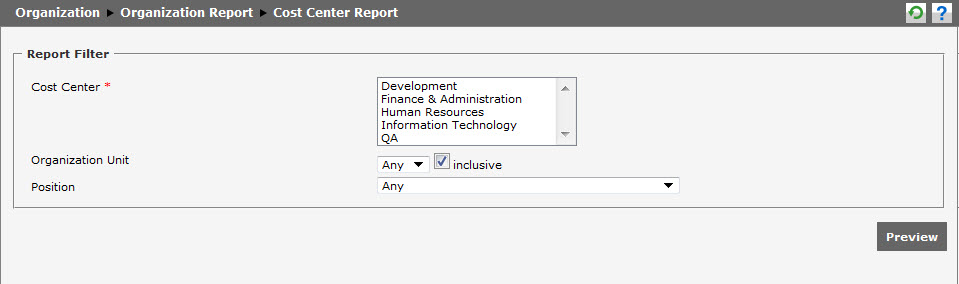
Cost Center Report contains the following information:
- Cost Center Code: It shows the codes of all cost centers in the company. Choose one of the codes.
- Organization Unit: It shows all organization units in the company. Choose one of the organization units, or choose Any to select all organization units.
- Position: It shows the existing positions in the company. Choose one of the positions, or choose Any to select all positions.
- Check Box Inclusive : It is the option when the "Inclusive" is selected, all existing positions will appear based on the organization unit. But if "Inclusive" is not selected, only the organization unit that will appear.
- Preview: After determining the criteria, click
 to show the Cost Center Report as exemplified in the example below.