Add On Duty Request
To add on duty request, go to Time & Attendance > On Duty Request then click  to show the following page.
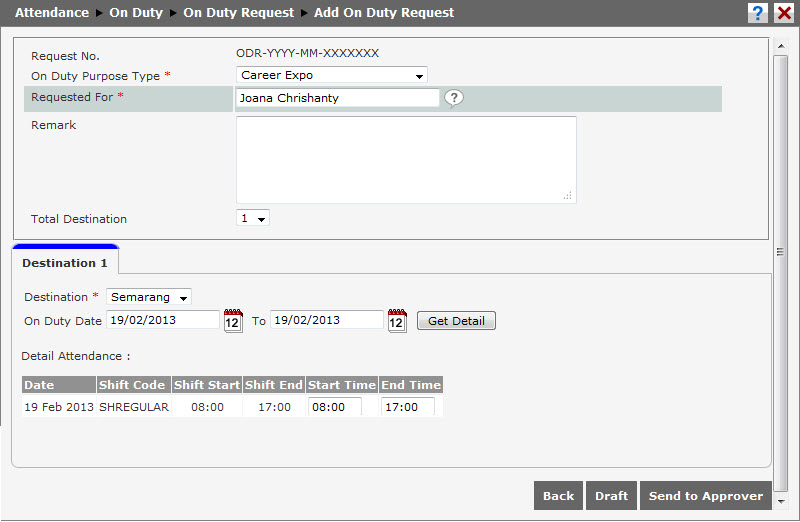
Complete the following information before adding new request.
- Request Number: This ID number is automatically generated by the system.
- Purpose Type: Choose the purpose from the available option. For example: Implementaion. The available option is configurable in On Duty Purpose.
- Request For: Choose the employee for the on duty request.
- Remark: Write a remark to support the request.
- Total Destination: Choose total destination. The number will affect how many tabs will be opened in detail page.
- Destination: Choose the destination from the available option. The available option is configurable in Master Data Setting at on duty destination table.
- On Duty Date: The date the employee starts and ends the on duty. Choose
 to show expense detail.
 - Determine the estimate cost in the available box. The expense can be calculated for a day or total days. Set the day or total day expenses in Setting > On Duty > Allowances Item.
Click  to save the request (editable). Click
  to send it directly to the approver. Click
  to cancel creating the request and go back to previous page.